 LuaBill
Documents with care
LuaLaTeX creates a consistent layout, readable item tables and multilingual text. Review the resulting PDF immediately in your usual viewer.
Free software for the people behind small businesses
Create clear invoices, quotations and orders with LuaBill. Enter your details in a familiar desktop form and let LuaLaTeX handle the typesetting — from a professional PDF to a structured electronic invoice.
Open source · No subscription · Documents processed on your computer
Starting a business takes skill, energy and courage. Formatting an invoice should not become another obstacle.
LuaBill is built for founders, independent professionals and small teams who want dependable business documents without a complicated workflow. Our aim is practical: reduce repetitive paperwork, make important details easier to check and give people more time for the work their customers value.
We use LuaLaTeX because careful typography makes a difference. LaTeX is an established system for high-quality technical and scientific publishing; LuaBill brings that care to everyday business documents through a graphical interface.
The project is open source and free to use. You can inspect the code, adapt it to your needs and help improve it. Germany is our first market, with support for German sellers working with customers in Germany, elsewhere in the EU and beyond.
The LuaBill desktop interface. Interface and document languages can be selected separately.
User guide ↗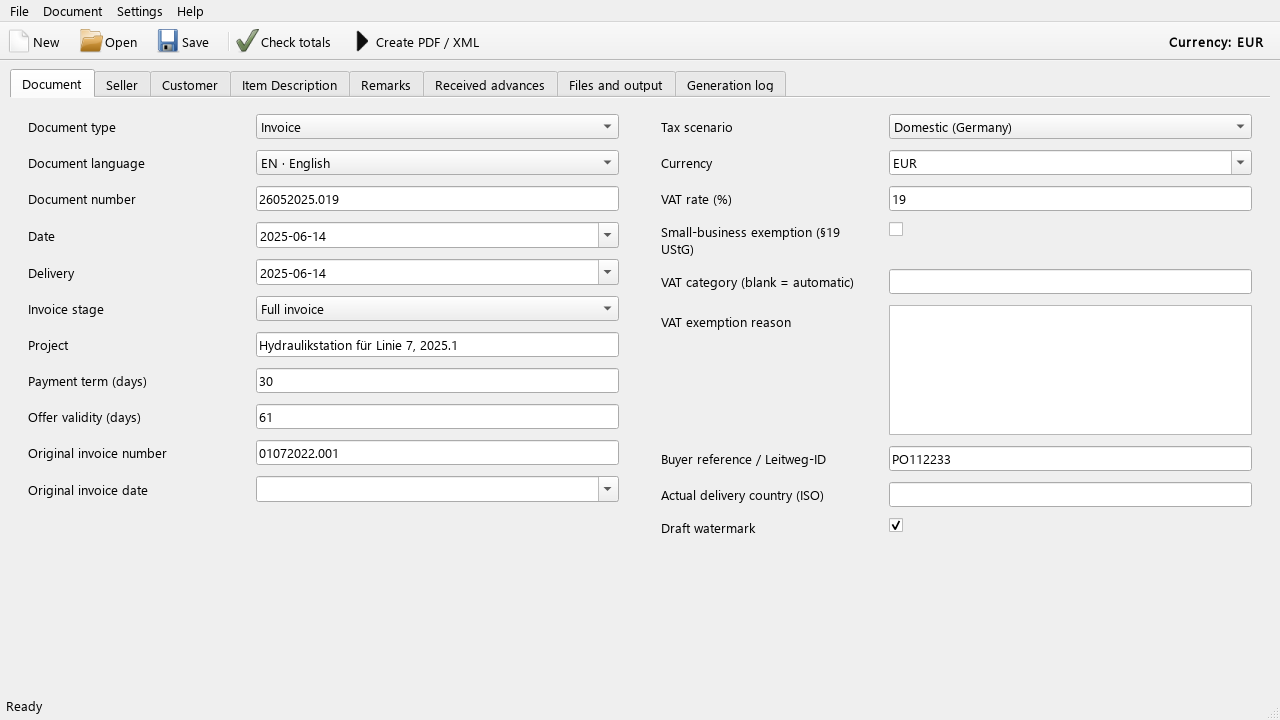
A desktop form for the details, a consistent template for the document and shared calculations for PDF and XML.
LuaLaTeX creates a consistent layout, readable item tables and multilingual text. Review the resulting PDF immediately in your usual viewer.
Create invoices, quotations, delivery notes, order confirmations, proforma invoices, purchase orders, credit notes, cancellation invoices, quotation requests and letters.
Export EN 16931 CII XML, XRechnung or ZUGFeRD with XML embedded in PDF/A-3. LuaBill runs external validation and keeps the result report alongside your files.
Choose English, German, French, Italian or Russian separately for the interface and document labels. Use EUR, USD, RUB, CNY and other currency codes; the active currency stays visible in the window.
Choose the supported German domestic or international B2B scenario. LuaBill prepares VAT explanations and optional statutory links from that choice and the tax groups in the document.
Work with quantities, discounts, mixed VAT rates and received advances. Net amounts, VAT and the amount due use the same calculation engine for the visual and structured output.
Use structured addresses, an optional customer number and separate fields for contact name, role, email, phone, mobile, fax and website. Supported contact links are clickable in the PDF.
Add project remarks, signature and stamp images, and an EPC/SEPA payment QR code for eligible EUR invoices. Signature images are visual marks; they are not cryptographic signatures.
Save editable .luabill projects and reusable seller profiles. The application remembers your language, window and output preferences; projects and generated results can live in separate folders.
Import existing .bill files, use the graphical editor or generate through the Python command line. A ready Windows installer and source-based Linux/macOS installers share the same application code.
You do not need to write Lua or LaTeX to fill in the form. Start with an example, then replace its fictional details.
Install a TeX distribution with LuaLaTeX and texlua, plus suitable fonts. Add Java 17+ for electronic invoices and Ghostscript for ZUGFeRD; the component links below explain your options.
Choose the package for your operating system. Open Help → Components and installation to see what was found, install anything missing and check again.
Choose a document type, language, currency, number, dates and VAT scenario. Enter the seller and customer details, including electronic addresses when the selected invoice format needs them.
Enter products or services, quantities, prices and discounts. Add remarks and any actual received advances, then use Check totals to find incomplete or inconsistent data.
Save the editable .luabill project, choose an output folder and create PDF/XML. Successful generation shows the result files and can open the PDF automatically.
Read the PDF and, for electronic formats, confirm that validation passed. Send XRechnung as XML or ZUGFeRD as its hybrid PDF through the recipient's agreed channel. Keep the issued files and validation report.
LuaBill runs locally. The packages differ in how Python and the interface libraries are installed; the document-generation tools remain separate on every platform.
v0.1.10 · 81.5 MB · EXE
Windows 10 version 1809 or newer, or Windows 11, x64. Python, PySide6/Qt and Mustang are included.
The installer is not yet signed with an Authenticode certificate, so Windows may show an unknown publisher. Verify the download source and published SHA-256.
v0.1.10 · 55.6 MB · GZ
Desktop Linux with glibc 2.34+ on x86-64 or glibc 2.39+ on ARM64. Requires Python 3.10–3.15, venv and pip; Python 3.12 or 3.13 is recommended. Alpine/musl is unsupported.
Python and Qt are not bundled. Native installation and graphical launch on Linux have not yet been verified in the current Windows build environment. Treat this package as a preview.
v0.1.10 · 55.6 MB · ZIP
macOS 14.4 or newer, Intel or Apple Silicon, with a compatible Python 3.10–3.15. Python 3.12 or 3.13 is recommended.
Python and Qt are not bundled. The locally created launcher has no Apple Developer ID signature or notarization, and native installation and graphical launch have not yet been verified on macOS here.
Windows has a ready application installer. Linux and macOS have preview installers from source. See each platform's requirements and verification status before downloading.
Install only the components your output needs. LuaBill's Help menu explains missing tools and links to their official download pages.
Required for document generation
Choose one TeX distribution. Keep it updated and install the packages used by LuaBill; a minimal TeX installation may need additional packages on first use.
Required for ZUGFeRD; optional for ordinary PDF
Ghostscript prepares PDF/A-3 for ZUGFeRD and can compress ordinary PDF output. Install it separately or through your operating system's package manager.
Required for XML, XRechnung and ZUGFeRD
A compatible JRE or JDK runs the included Mustang validator and packager. Ordinary PDF generation does not need Java.
Included on Windows; set up separately on Linux/macOS
Python runs the application and PySide6/Qt supplies the windows and menus. Linux/macOS installers create an isolated environment; they require an existing compatible Python and download PySide6 during setup.
Recommended for all document languages
Install a suitable Unicode font so that Latin and Cyrillic text render correctly. Your operating system or TeX distribution may already provide the required fonts.
Once setup is complete, document processing is local. Installing dependencies or missing TeX packages may access the Internet. Restart LuaBill after changes to your system PATH.
A PDF filename does not tell you whether it contains an electronic invoice. Choose the format the recipient accepts and check what LuaBill generated.
A visual business document for reading, printing and review. An ordinary PDF does not contain a structured invoice dataset.
Send where an ordinary PDF is the appropriate agreed format.
A structured CII invoice with a separate visual PDF and a validation report.
The XML is the structured invoice. Send it through the agreed channel; the PDF can accompany it as a view.
Structured XML with the references and electronic endpoints required by the chosen profile. A separate PDF view helps you review the content.
Submit the XML to the recipient's address or portal, using the routing reference they supplied.
A hybrid PDF combines the readable document and its EN 16931 XML attachment. LuaBill also saves an identical separate XML file.
Normally send the hybrid PDF. Follow the recipient's requirements if they also request the separate XML.
Yes. LuaBill's own code and documentation are available under Apache License 2.0, including for commercial use under its terms. There is no LuaBill subscription. Third-party components keep their original licenses.
No. The graphical form handles ordinary editing. LuaLaTeX must be installed, but you do not need to write LaTeX commands to fill in the structured fields. Developers can adapt the source and templates.
LuaBill generates documents locally and does not upload invoice data to a generation service. Initial dependency installation may use the Internet. Sending the finished invoice is a separate step that you control.
The current version supports sellers based in Germany and customers in Germany, other EU countries or outside the EU. Select the actual transaction scenario and delivery country; a foreign customer alone does not establish a VAT exemption.
Yes. Choose a currency code independently of the customer's country. LuaBill does not perform exchange-rate conversion. The payment QR code is for eligible EUR/SEPA invoices; electronic monetary totals support at most two decimal places.
The hybrid PDF already contains the XML. Normally that PDF is sent as the invoice; the recipient may have additional requirements. XRechnung, by contrast, is submitted as its XML file, not just the PDF view.
The initial suggestions are Documents/LuaBill/Projects and Documents/LuaBill/Output. You can choose other folders. The output location is a preference for your user account on that computer; it is not stored as a fixed path in every project.
A Windows installer is available with Python and Qt included. Linux and macOS packages install from source and are currently previews: their native installation and graphical launch still need verification on those operating systems.
LuaBill focuses on preparing business documents. It does not replace bookkeeping, tax advice, a legally assessed archive or the controls for your invoice-number sequence. Quotations and orders remain PDF business documents, not electronic invoices.
Open the Generation log and the validation report for the specific error. Help → Components and installation shows missing tools; the multilingual user guide explains fields and common problems. Correct the project and generate again.
LuaBill is an open project. Practical feedback from people who issue real business documents is as valuable as a code contribution.
Test a quotation, invoice or order with fictional data. Describe what you expected, what happened and which version and operating system you used.
Help refine translations, examples and explanations. Clear words make unfamiliar fields easier for the next person.
Help verify Linux/macOS setup, fonts, printer output and invoice exchange with recipient systems. Share reproducible findings without customer or banking secrets.
Download the source, read LICENSE and NOTICE, and explore the templates and tests. Improvements to accessibility, validation and document layout are welcome.
Have a concrete suggestion or want to help? Contact the authors using the links on this page. No account is needed to use the application.